Key Takeways
AI has created a blind spot for traditional DLP: What employees type into ChatGPT or Claude can bypass controls built for files and attachments.
Regex can’t understand context: Sensitive business information doesn’t always contain obvious patterns or keywords.
Browser-only protection isn’t enough: Desktop AI apps like ChatGPT Desktop, Claude Desktop, and Cursor create an entirely different visibility gap.
Detection after exposure isn’t prevention: On-device AI classification can inspect prompts before sensitive data leaves the endpoint.
The future of AI DLP is contextual: Real-time classification, granular policies, desktop coverage, and compliance controls let teams adopt AI without simply blocking it.
An executive whitepaper on how AI-Native DLP differs from legacy DLP, and what it means for enterprise security strategy.
Download WhitepaperWhy Traditional DLP Cannot See What Gets Typed Into AI Tools
Traditional DLP Was Built for Discrete File Transfers
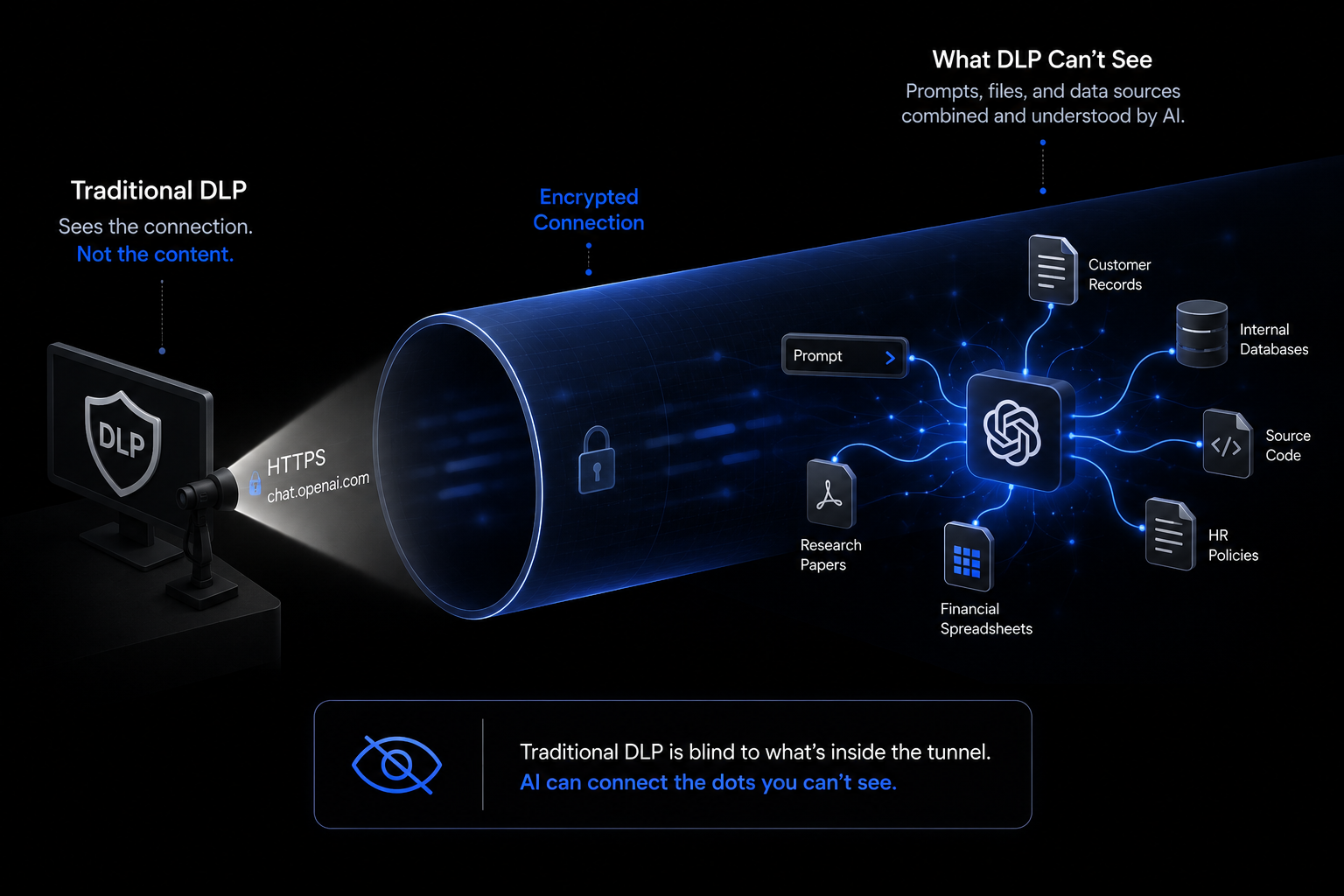
Traditional data loss prevention systems operate on a single assumption: sensitive data moves as identifiable objects across monitored boundaries. Email attachments trigger scans. USB transfers generate alerts. File uploads to cloud storage pass through gateways where pattern matching runs against the payload. The architecture worked because data exfiltration followed a predictable structure.
Generative AI tools break that structure entirely. When an employee copies a block of text from a customer database and pastes it into ChatGPT, no file leaves the endpoint. No attachment crosses the email gateway. The DLP agent watching the device sees an HTTPS connection to a known domain, but the prompt content travels encrypted inside the API request body. Without visibility into that text payload, legacy endpoint and network DLP systems have no mechanism to classify what just left the organization.
Pattern Matching Misses Natural Language Prompts
Regex-based pattern matching was designed to catch structured data: credit card numbers, Social Security Numbers, specific file types. Conversational prompts do not follow those patterns. A user can type "Summarize the Q3 pipeline for our top healthcare accounts" without including a single element that would trigger a traditional DLP rule. That prompt still surfaces deal values, client names, and contract terms in the AI's response.
The Samsung incident makes this visible. Engineers pasted proprietary semiconductor source code into ChatGPT across multiple sessions before the company identified what had happened. The code contained no SSN patterns. No card numbers. Legacy DLP watched the traffic and flagged nothing, because the content was unstructured technical IP that fell outside every predefined rule.
Browser-Only Tools Miss Desktop AI Applications
Browser extensions intercept prompts typed into web-based AI tools. They cannot see desktop applications. ChatGPT Desktop, Claude Desktop, Cursor, and other native AI clients access local filesystems, read clipboard data, and execute actions at the OS level without generating the network events that browser-based DLP relies on. A developer can drag a confidential PDF directly into Claude Desktop, and a browser extension has zero visibility into that interaction.
The coverage gap is not a configuration problem. It is a structural one.
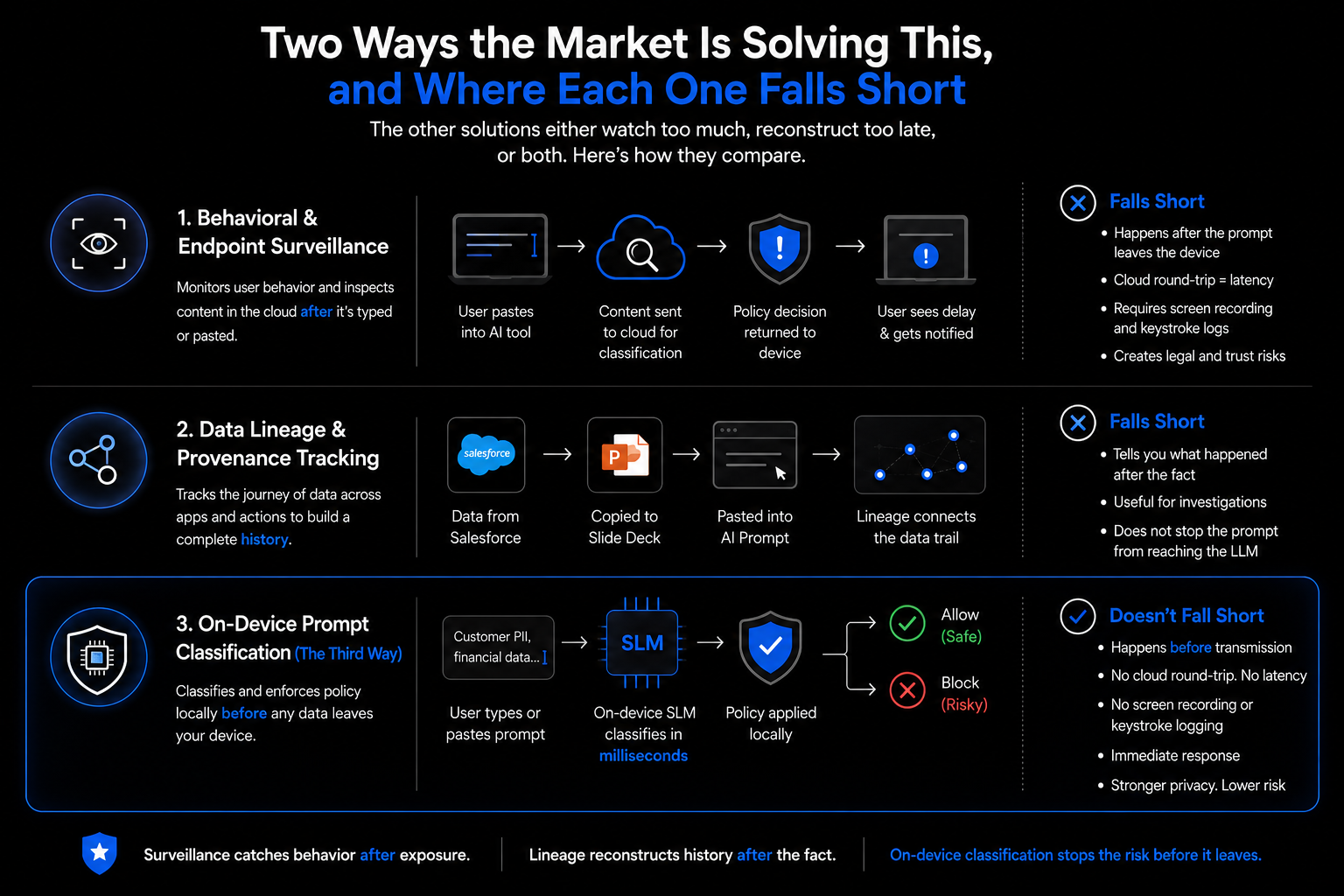
Two Ways the Market Is Solving This, and Where Each One Falls Short
Behavioral and Endpoint Surveillance Approach
The first wave of AI DLP extends traditional endpoint controls into browser sessions. Platforms like Microsoft Purview monitor user behavior through Indicators of Behavior (IoBs), adjusting enforcement based on calculated risk scores. When a user attempts to paste content into a browser window, the system captures it, sends it to cloud-based classification, and returns a policy decision to the local device.
The problem is sequencing. Classification happens after the prompt leaves the device. Cloud analysis introduces latency, and users sit through policy-evaluation notifications while the system processes content. That alone creates friction.
The deeper issue is what these systems collect to make it work. Some implementations require screen recordings and keystroke logs to reconstruct data activity. For mid-market teams, that creates legal exposure and employee trust problems that are harder to manage than the original data risk.
Data Lineage and Provenance Tracking Approach
Data lineage tools take a different approach. Instead of monitoring behavior, they track where data originates and how it moves. If an employee copies text from Salesforce into a slide deck and then pastes it into an AI prompt, lineage tracking connects those steps into a single data history. The system builds that context by monitoring clipboard actions, browser behavior, and application usage in real time.
The limitation is directional. Lineage tracking tells you what happened after the fact. It is useful for investigations and forensic reviews, but it does not stop anything. By the time a lineage system flags a policy violation, the prompt has already reached the LLM.
The Third Way: On-Device Prompt Classification
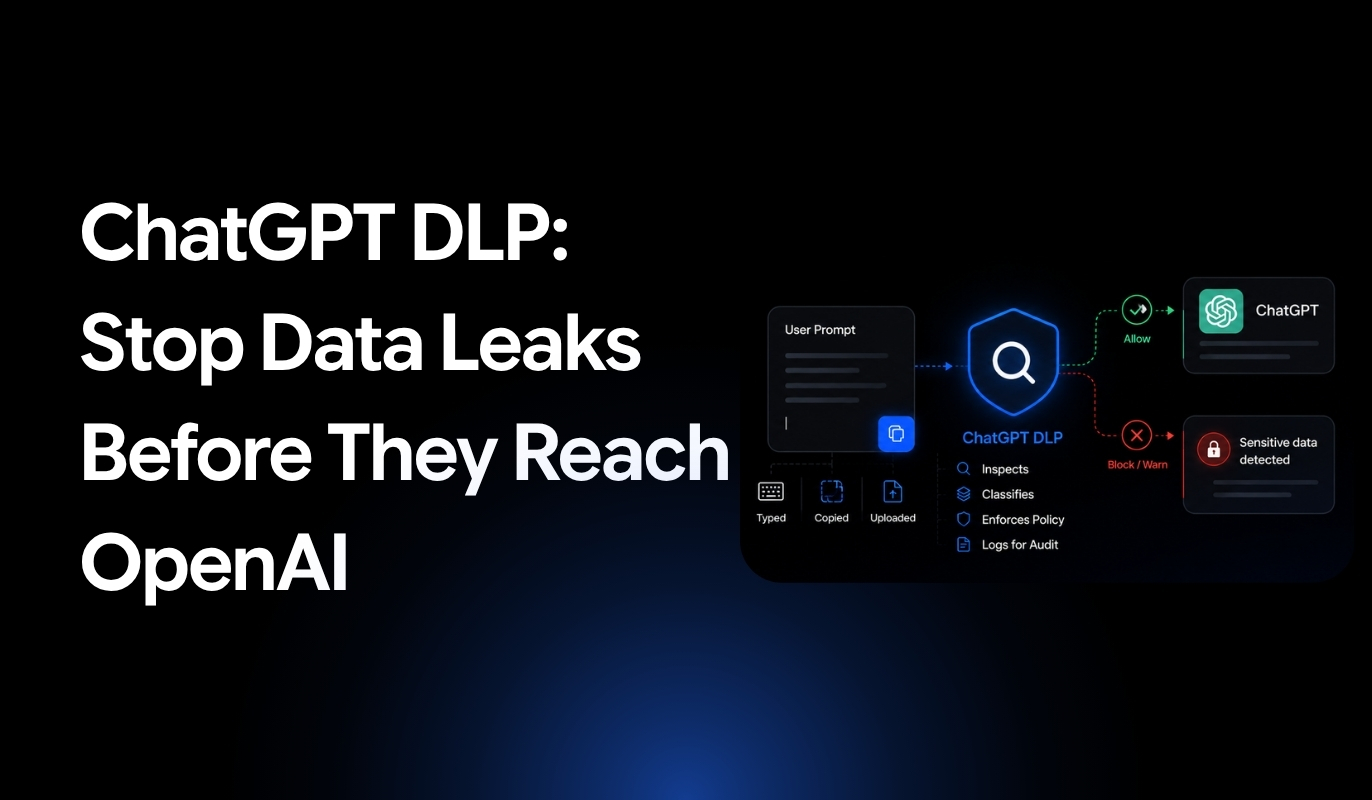
On-device classification moves the enforcement point to before transmission. A small language model (SLM) runs directly on the endpoint, reading prompt content locally before any API request leaves the device. Classification completes in milliseconds. The policy decision executes before the data moves.
No cloud round-trip. No screen recording. No keystroke logging. The agent reads the prompt, classifies the content, applies the relevant policy, and either allows or blocks the request. The user sees an immediate response.
That is the gap the first two approaches do not close. Surveillance catches behavior after exposure. Lineage reconstructs history after the fact. On-device classification stops the risk before it leaves.
How Wald's Desktop DLP Agent Classifies Prompts Before They Leave the Device
On-Device SLM Classification
Wald runs a small language model directly on the endpoint. Every prompt gets read before it reaches an external AI service. Classification completes locally in under a second, with no visible delay for the user.
The distinction from traditional pattern matching is significant. The model analyzes semantic meaning, not keyword patterns. It can differentiate between a developer pasting debugging code and an employee uploading customer payment records, even when neither contains a flagged term. That level of contextual understanding is what regex-based rules cannot replicate.
Small language models operate with fewer than 10 billion parameters, which makes them efficient in resource-constrained environments. Classification runs on standard employee devices without GPU acceleration or cloud connectivity. Sensitive prompt content never leaves the device unencrypted for analysis.
Why the Agent Architecture Matters
Browser extensions intercept prompts entered into web-based AI tools. Desktop applications are outside their reach. Wald's desktop agent operates at the OS level, capturing clipboard actions, form submissions, and file uploads across browsers, native AI clients, and any application that connects to an external AI service.
This covers ChatGPT Desktop, Claude Desktop, Cursor, and other native clients that browser-only tools miss entirely.
Four-Tier Policy Engine: Allow, Monitor, Warn, Block
Wald enforces policy through four distinct actions:
- Allow: The prompt passes without restriction beyond standard audit logging
- Monitor: The activity generates a security team event without interrupting the user
- Warn: The user receives an inline notification explaining the policy concern and can choose to proceed or revise
- Block: Transmission is prevented and the attempt is logged
The granularity here matters. Organizations that go straight to hard blocks tend to push employees toward personal accounts and unsanctioned tools. Starting in monitor mode establishes a usage baseline. Warnings coach users at the point of action. Blocks get applied selectively, where the risk actually warrants it.
This supports a progressive rollout rather than a disruptive one.
Platform Coverage
The agent monitors ChatGPT, Claude, Gemini, and Microsoft Copilot across both browser and desktop interfaces. Coverage applies regardless of which surface the employee is working from.
What to Look for in a Generative AI DLP Solution for a Regulated Mid-Market Team
Choosing an AI DLP solution is not just a feature comparison exercise. For regulated mid-market teams, the gap between what a solution claims to do and what it actually enforces in practice determines whether data stays protected or not.
These are the criteria that matter.
Real-Time Inline Enforcement
The enforcement point is everything. Solutions that route prompts through cloud-based classification or analyze content after transmission introduce a window where sensitive data has already left the device. That window is where exposure happens.
Inspection must occur at the endpoint, before the API call executes. Anything else is detection, not prevention. For regulated teams, detection after the fact does not satisfy compliance requirements or reduce actual risk.
Desktop-Native AI App Coverage
Browser extensions cover web-based AI tools. They cannot see what happens inside desktop applications.
ChatGPT Desktop, Claude Desktop, Cursor, and similar native clients operate at the OS level. They bypass browser-based controls entirely. An employee can paste a confidential document directly into a desktop AI client, and a browser extension will not register the event.
Endpoint agents that intercept at the system level cover both surfaces. Without that OS-level coverage, there are blind spots that users will find, whether intentionally or not.
Compliance Framework Support
Regulated teams cannot build policy from scratch for every data type. Solutions should include pre-built templates aligned to HIPAA, GDPR, PCI-DSS, and CCPA requirements.
Detection needs to identify PHI, PII, cardholder data, and other regulated content types without requiring manual rule creation for each scenario. Audit logs must document what was detected, which policy applied, and what action the system took. Regulators expect that level of traceability. Solutions that cannot produce it create liability rather than reducing it.
Deployment for Lean IT Teams
Most mid-market security teams do not have a dedicated DLP administrator. They cannot absorb a multi-month deployment or ongoing tuning cycles that require specialist knowledge.
Solutions should be operational in days. Agents should run with low performance overhead that does not generate help desk tickets. Minimal configuration on the front end, and minimal maintenance after.
If deployment complexity becomes its own project, the solution is adding operational burden rather than reducing risk.
Policy Granularity for Coaching and Warnings
Hard blocks create friction. Friction drives users toward personal accounts and unsanctioned tools. That trade-off consistently produces worse outcomes than the risk the block was meant to prevent.
Policy engines that support monitor, warn, and block modes allow teams to roll out controls progressively. Users receive coaching at the point of action, which builds awareness without interrupting workflow. Over time, that approach changes behavior more effectively than enforcement alone.
Static block-or-allow is not a policy strategy. It is the absence of one.
FAQs
What is Generative AI DLP?
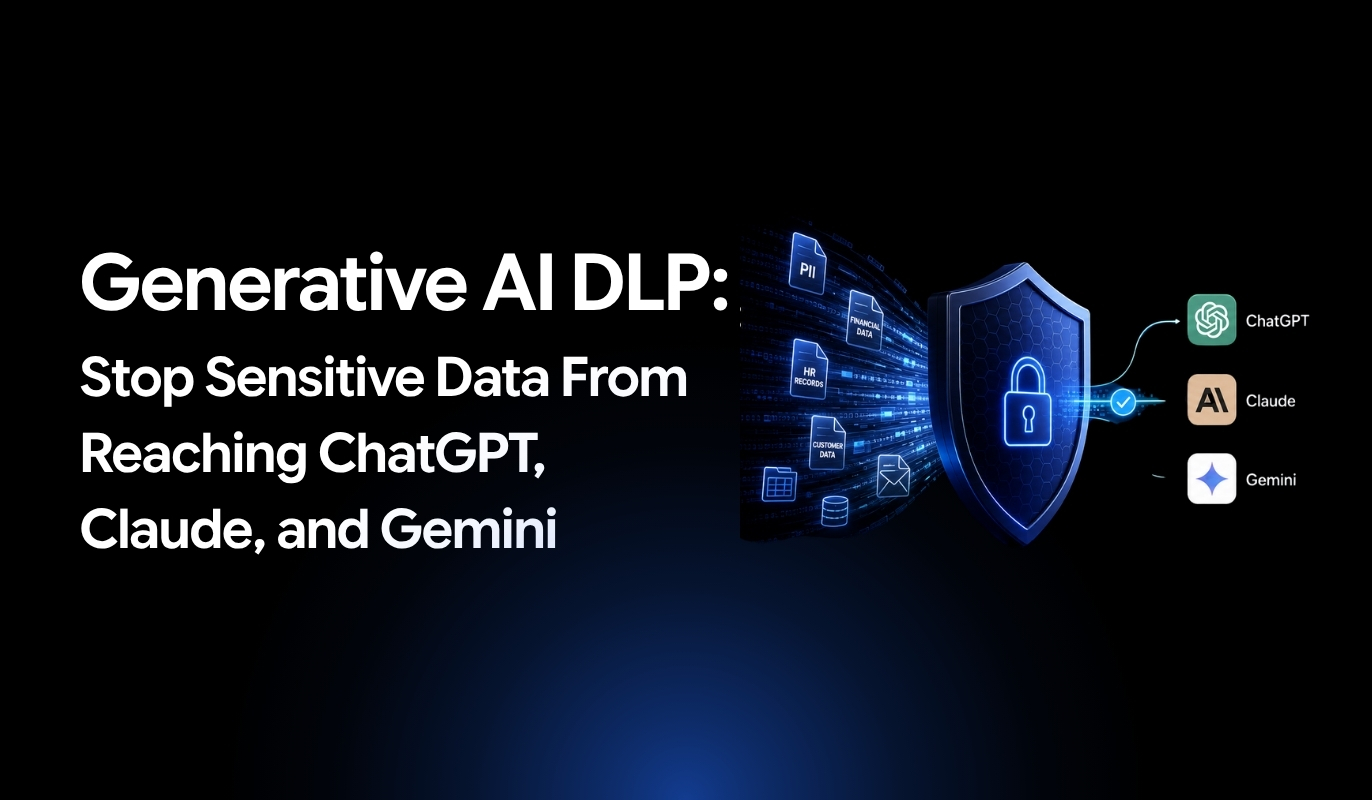
Generative AI DLP is a security framework that inspects, classifies, and governs sensitive data as it moves into and out of AI systems through prompts, uploads, and model responses. Traditional DLP monitors email attachments and file transfers. Generative AI DLP watches the prompt box — the conversational interface where employees interact directly with external AI platforms.
Is Generative AI DLP the Same as Blocking ChatGPT or Claude?
No. Blocking AI tools entirely pushes employees toward personal accounts and unsanctioned services. That is how shadow AI expands. Generative AI DLP allows approved interactions to proceed while blocking or redacting sensitive content in real time — maintaining productivity without leaving data exposure unaddressed.
Does Generative AI DLP Work on Desktop Apps?
Endpoint-based solutions monitor desktop AI applications including ChatGPT Desktop, Claude Desktop, and similar native clients that browser extensions cannot reach. Coverage requires OS-level interception. Without it, activity across desktop apps and any application accessing external AI services falls outside visibility entirely.
Does Generative AI DLP Require Screen Recording or Keystroke Logging?
Not necessarily. Some legacy approaches reconstruct data activity through screen recordings and keystroke logs. Modern on-device classification analyzes prompt content directly, without the surveillance overhead that creates employee trust issues and raises legal questions.
What Compliance Frameworks Does Generative AI DLP Need to Support?
Regulated teams require coverage for HIPAA, GDPR, PCI DSS, and CCPA. Detection needs to identify PHI, PII, cardholder data, and other regulated content types. Audit logs must document what was detected, which policy applied, and what action was taken — not just for internal review, but to satisfy regulatory expectations.