Key Takeaways
- The biggest AI data leaks don’t happen through hackers. They happen when employees paste sensitive data into AI tools to get work done faster.
- Traditional DLP wasn’t built for AI. It protects files and emails, while today’s biggest risks happen through prompts, copy-paste actions, and browser-based AI.
- Effective AI DLP doesn’t just detect sensitive data. It intercepts prompts before they’re sent and enforces policy in real time at the endpoint.
- The goal isn’t to block AI. It’s to let employees use AI safely by protecting sensitive data without disrupting productivity.
An executive whitepaper on how AI-Native DLP differs from legacy DLP, and what it means for enterprise security strategy.
Download WhitepaperI’ll start with something most security vendors won’t say: if your company has more than a few dozen people, ChatGPT is already part of how work gets done there. Your policy might say otherwise. Your firewall rules might say otherwise. But your engineers, analysts, support agents, and HR staff are pasting company data into AI tools every day. They aren’t doing it to cause harm. They’re doing it because it works.
I’ve talked to a lot of CISOs, compliance heads, and IT leaders at banks, healthcare providers, and law firms. Almost every one of them asks some version of the same question: “How do we let people use ChatGPT without losing control of our data?”
That question is what ChatGPT DLP is about. Most of what the market sells as “DLP for ChatGPT” today doesn’t answer it. Here’s why, and what an answer actually takes.
The Problem Isn’t Whether Employees Use ChatGPT. It’s What They Paste Into It.
Engineers paste source code because it’s the fastest way to debug
In 2023, Samsung engineers leaked proprietary semiconductor data to ChatGPT in three separate incidents. One pasted buggy database source code and asked for a fix. Another submitted equipment code for optimization. A third had ChatGPT turn a recorded internal meeting into minutes. Samsung’s first response was to cap prompts at 1,024 bytes and open internal investigations.
What sticks with me about Samsung is that nobody involved was a bad actor. These were skilled engineers using the best tool they had. That’s what makes this risk so hard to manage: it comes from your most productive people, not your least trustworthy ones.
It’s not just Samsung. Defense contractors and federal suppliers have blocked ChatGPT outright for the same reason. Proprietary code and sensitive technical information leave through the prompt box. The cause isn’t intent. It’s habit.
Support and public-sector teams paste customer records to clear backlogs
A contractor working for an Australian state government agency uploaded a spreadsheet to ChatGPT that held personal details of roughly 3,000 flood victims, including names, contact information, and health-related data. The contractor was trying to get through disaster-recovery applications faster.
Healthcare follows the same pattern. Clinicians and admin staff paste patient notes into public AI tools to summarize them or draft documentation. If that protected health information goes to a vendor with no Business Associate Agreement, you have a HIPAA problem. The person meant to be efficient. The organization ends up with a reportable incident.
Finance uploads models because OpenAI tells them to
OpenAI openly markets ChatGPT’s ability to analyze uploaded spreadsheets: finding variance drivers, spotting anomalies, summarizing trends. Finance teams took that literally. Budget models, regional performance comparisons, and revenue breakdowns by product line all get uploaded.
Each of those files carries something that should never leave the building: deal structures, client account details, margin analysis, pricing strategy. In finance, the upload itself is the leak.
Personal accounts sit outside every control you own
Here’s the part that should worry security leaders most. Cyberhaven’s research shows that a significant share of workplace ChatGPT use happens through personal accounts. Some people use them for convenience, some to get around restrictions, and some just because that’s the account they were already logged into.
On a consumer ChatGPT account, conversation history is saved by default, and prompts can be used to train models unless the user opts out. Your corporate policy doesn’t reach that account. Your DLP rules don’t apply to it. Your ChatGPT Enterprise contract doesn’t cover it. But it’s handling the same data as everything else.
Why Traditional DLP Fails as ChatGPT DLP
I’ve spent years watching security teams try to stretch legacy DLP over generative AI. It doesn’t fit, for structural reasons.
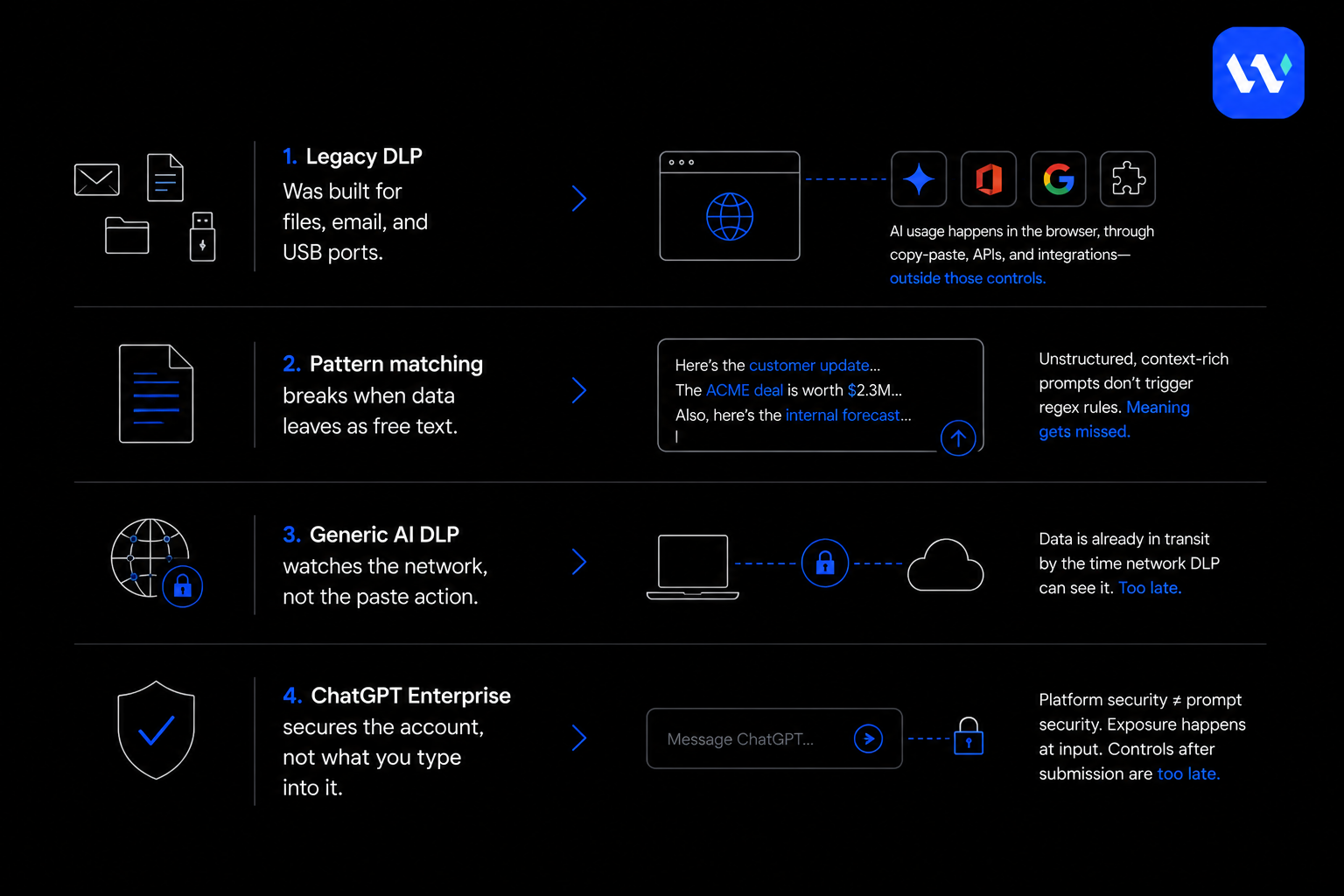
Legacy DLP was built for files, email, and USB ports
Traditional DLP watches predictable exits: email attachments, file transfers, network traffic, sanctioned cloud apps. The model assumed data travels known routes and you can put a checkpoint at each one.
Generative AI broke that assumption. Data now leaves through copy-paste into a browser tab, through AI features built into Microsoft 365 and Google Workspace, through desktop AI apps, and through third-party LLM integrations. Most of these interactions involve no file transfer at all, so there’s no attachment to scan, no USB device to flag, and no email to inspect.
Pattern matching breaks when sensitive data travels as plain prose
Legacy DLP classifiers look for structure: Social Security numbers, credit card formats, known file signatures. What employees type into ChatGPT is mostly unstructured: meeting notes, draft strategy memos, code, paraphrased contract terms.
Here’s a test I give every security team I meet. Take a prompt like this:
“Our enterprise pipeline dropped about 30% this quarter and two of our top five accounts are considering churning. Help me draft a retention strategy for the board that doesn’t spook investors.”
That prompt contains no SSN, no card number, and no keyword a regex would catch. It’s still a trade secret. We’ve run prompts like this through Microsoft Purview and other mainstream DLP tools, and they go straight through.
You can try to write a rule for it. You’ll end up with one of two outcomes. Either the rule is so narrow it misses the next variation, or it’s so broad that it blocks half of legitimate work, drowns your team in false positives, and pushes employees to their personal accounts. That’s the trap with pattern-based DLP for ChatGPT: you can’t write policies for meaning using tools that only understand format.
Network DLP watches the wire, not the paste
Network DLP inspects traffic at egress points. HTTPS hides payloads unless you run SSL inspection, and remote employees on direct-to-cloud connections skip your gateway entirely. When a developer pastes proprietary code into a desktop AI assistant, there’s nothing useful to inspect until the data has already left.
The moment that matters is the moment of input, and network tools can’t see it.
ChatGPT Enterprise secures the account, not the prompt
I often hear: “We bought ChatGPT Enterprise, so we’re covered.” You’re not, at least not for this.
ChatGPT Enterprise gives you encryption, SSO, retention controls, and a commitment not to train on your data. Those are real protections, and I’d recommend it over consumer accounts. But they cover how the platform stores and handles data after it arrives. They do nothing to check what an employee types into the window before pressing Enter.
The account is secured. The prompt isn’t. And Enterprise does nothing about the personal account sitting in the next browser tab.
What Real DLP for ChatGPT Has to Do
When we started building Wald, we set ourselves three non-negotiable rules for ChatGPT DLP:
- Intercept at the endpoint, at the moment of input, before anything is sent.
- Classify by meaning, not by pattern.
- Enforce before transmission, quickly enough that users don’t notice.
If a product misses any of those three, it’s reporting on leaks after they happen, not preventing them.
1. Intercepting prompts at the endpoint, before submission
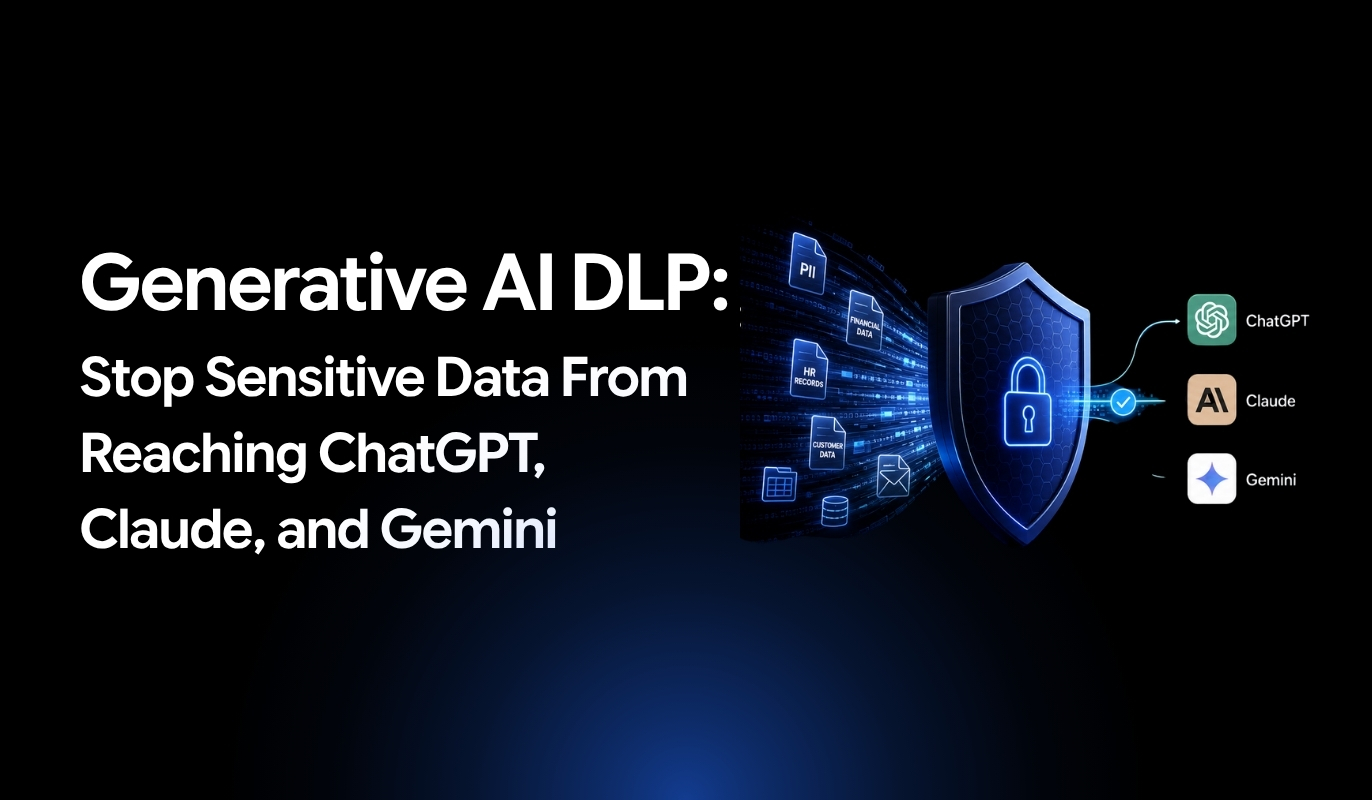
Wald runs as a lightweight browser extension that intercepts prompts at the point of submission. Typed text, pasted content, and file uploads are all captured locally on the device before they reach ChatGPT, Claude, Gemini, Microsoft Copilot, Perplexity, or any other generative AI tool.
Coverage also extends to the ChatGPT desktop app on Windows and macOS, not only browser sessions. The endpoint is where data actually leaves, so that’s where control has to be.
2. Classifying by meaning with an on-device small language model
This is the core of what we built. Each endpoint runs a small language model (SLM) on the device that reads a prompt the way a person would. It understands that a paragraph describing a customer’s account is sensitive. It catches contract terms that have been paraphrased. It flags the pipeline-and-churn prompt above, even though there’s nothing in it for a pattern to match.
Because the model runs locally, prompt content never goes to a cloud service for inspection. I think this matters more than people realize. Many “AI DLP” products fix the leak problem by sending your sensitive prompts to their own cloud for analysis. That doesn’t remove the risk. It just moves it to another vendor.
3. Delivering a verdict before data reaches OpenAI
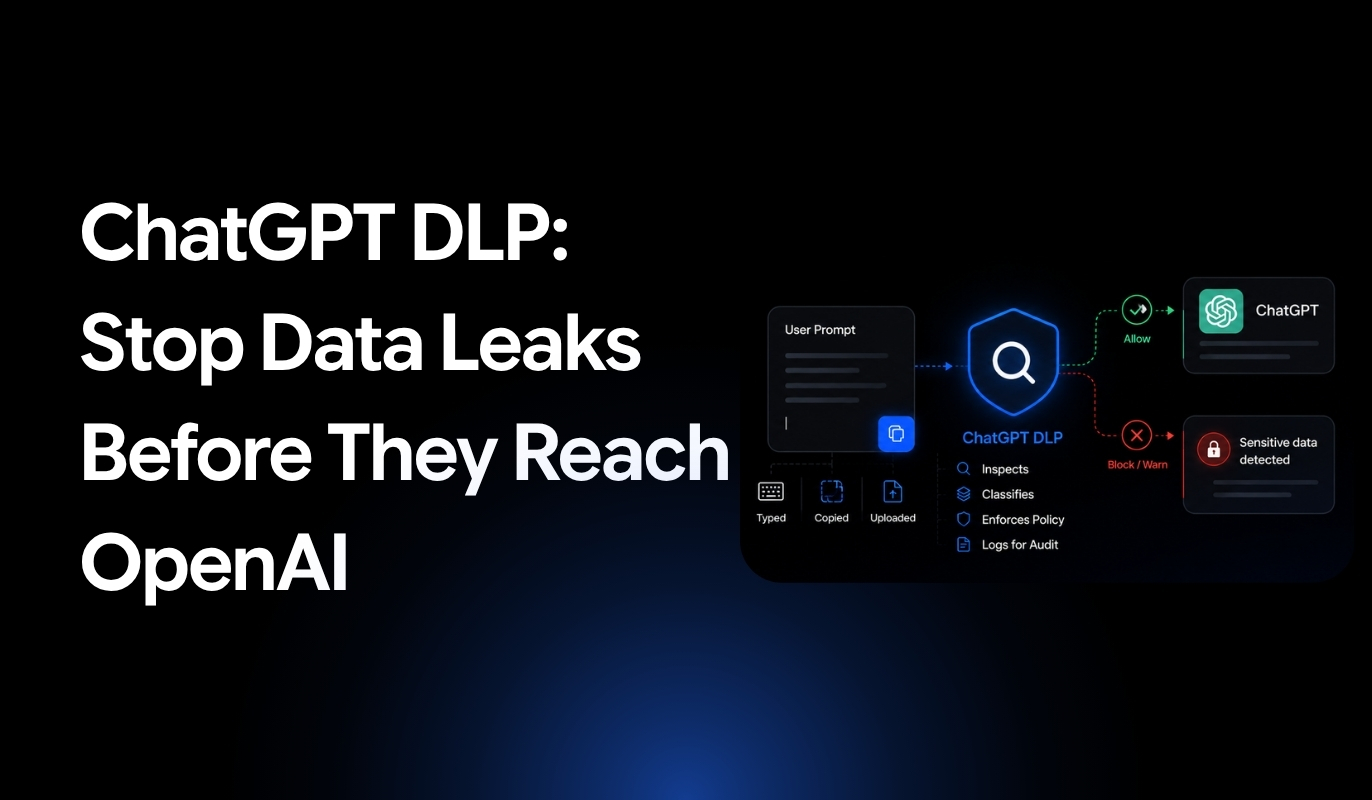
Wald’s policy engine evaluates every prompt against your rules and returns a decision in under 100 milliseconds, before transmission finishes. There are three outcomes:
- Allow: the prompt goes through without interruption.
- Warn: the user sees a contextual notice explaining what was detected before they submit.
- Block: submission is stopped.
No sensitive data reaches OpenAI’s servers until that verdict is enforced. That ordering is what makes this an actual control and not just a dashboard.
Keeping people productive without taking away their judgment
I’ve watched blunt blocking fail at a lot of companies. When a tool silently blocks work, people find workarounds within a day: they retype the content, switch to their phone, or log into a personal account. You end up with less visibility than before.
So we built Warn as a first-class option. When a prompt triggers a policy, the user sees what was detected and why. If they have a legitimate business reason, they can enter a justification and continue, provided your organization allows overrides. You decide which data types can be overridden and which are hard blocks.
You get a defensible audit trail, and your employees are treated as professionals rather than suspects. In my experience, that’s what drives adoption.
What Wald’s ChatGPT DLP Actually Catches
Enforcement only matters if classification is accurate. Here’s what our on-device SLM detects in real deployments:
Source code and intellectual property. Code copied from IDEs, terminals, and Git repositories before it reaches ChatGPT or Copilot, including proprietary algorithms, API keys in config files, and references to internal libraries. Pattern-based DLP mostly misses these because there’s no fixed string to match.
PHI and PII from clinical, support, and HR workflows. Patient symptoms and treatment notes pasted in for summaries. Support transcripts with account numbers and contact details. Performance reviews and salary data. A prose description with no SSN still triggers classification if its meaning is sensitive.
Financial models and deal documents. Budget models, variance reports, client summaries, deal structures, and pricing intelligence, including content inside Excel formulas and pivot tables, flagged before the upload completes. Sometimes the risk is in the attachment, not the typed text.
Trade secrets in plain language. Strategy discussions, pipeline commentary, M&A deliberations, and board prep: the content legacy DLP was never designed to recognize.
Personal accounts and unsanctioned tools. The same classification and policies apply whether someone is using ChatGPT Enterprise, a personal ChatGPT login, Claude, Gemini, Copilot, or Perplexity, in Chrome, Edge, or Firefox. Switching tools doesn’t switch off the controls.

Built for Regulated Mid-Market Organizations
Most enterprise DLP was designed for Fortune 100 companies with dedicated DLP teams and 18-month rollouts. Most of our customers have neither, so we built for them.
Deploys in a day, not a quarter
The Wald extension is pushed through your existing MDM in minutes. The on-device SLM downloads automatically during setup. Pre-configured policies for banking, healthcare, and legal are ready to enforce on day one. There’s no hardware, no database to stand up, and no six-month policy-writing project. You’re governing AI usage before the end of the first day.
No dedicated DLP team required
Semantic classification greatly reduces the false positives that consume analyst time in pattern-based systems. Policies are managed from a single console. Incidents come with context, not raw logs you have to piece together. One security administrator can run Wald.
HIPAA, GDPR, and PCI-DSS coverage out of the box
Pre-built templates map to HIPAA’s PHI identifiers, GDPR personal data categories, and PCI-DSS cardholder data requirements. Every flagged prompt is logged with what was detected, who submitted it, which action was taken, and when. That’s the evidence examiners and auditors ask for, without building custom reports.
Frequently Asked Questions
Can ChatGPT Enterprise prevent employees from submitting sensitive data in prompts?
ChatGPT Enterprise provides encryption, SSO, and data retention controls for the platform itself, but it doesn't inspect or classify the actual content of prompts before they're submitted. While it secures the account and ensures data isn't used for training, it doesn't prevent users from typing or pasting sensitive information into the chat interface.
Why don't traditional DLP solutions effectively monitor ChatGPT usage?
Traditional DLP systems were designed to monitor predictable channels like email attachments, file transfers, and USB ports. They struggle with browser-based AI tools because data often moves through copy-paste actions and direct web interactions rather than file transfers. Additionally, pattern-matching approaches fail to detect unstructured content like meeting notes or code snippets that don't contain obvious identifiers like credit card numbers.
How can organizations balance AI productivity with data security?
Organizations can provide employees with compliant AI tools through enterprise agreements that include data protection guarantees, such as ChatGPT Team accounts with Data Processing Agreements or Microsoft Copilot. Combining approved AI tools with clear usage policies, employee training, and endpoint monitoring creates a framework that enables productivity while maintaining audit trails and compliance controls.
What types of sensitive data commonly leak through AI prompts?
Common data leaks include source code and proprietary algorithms from development environments, customer personally identifiable information (PII) and protected health information (PHI) from support tickets and healthcare records, financial models and deal structures from spreadsheets, and strategic planning documents. These leaks often occur through copy-paste actions or file uploads that bypass traditional security controls.
Does blocking public AI tools completely solve the data leakage problem?
Blocking public AI tools addresses part of the problem but doesn't eliminate it entirely. Employees may use personal devices, find workarounds, or simply retype information they can view on screen. A more effective approach combines technical controls with approved alternatives, clear policies, user education, and monitoring solutions that can detect and prevent sensitive data from being submitted regardless of the access method.
Does Microsoft Purview already cover DLP for ChatGPT Enterprise?
Purview provides DLP across all Microsoft services, but organizations using ChatGPT and other third-party/publicAI tools often need additional controls. Wald inspects prompts before they’re sent to AI models, extending protection across ChatGPT, Claude, Gemini, and more.
Does Wald monitor copy-paste into ChatGPT, or only typed prompts?
Wald inspects both typed and pasted prompts. Any content sent to ChatGPT is analyzed for sensitive data before it reaches the AI model.
What’s the difference between AI DLP and traditional DLP?
Traditional DLP protects files, emails, and uploads. AI DLP or DLP for AI protects conversations by inspecting prompts for sensitive information before they’re sent to AI assistants.
Does Wald work with the ChatGPT desktop app or only in the browser?
Yes. Wald supports both browser-based desktop app based usage of ChatGPT.
If Wald blocks a prompt, does the employee know why?
Yes. Wald explains why the prompt was blocked with the sensitive data classification and, if your policy allows, it lets users edit the prompt, provide a justification, or request an override.