.png)
- Shadow AI detection starts with an inventory: which AI tools, accounts, and agents employees use, and what data goes into them.
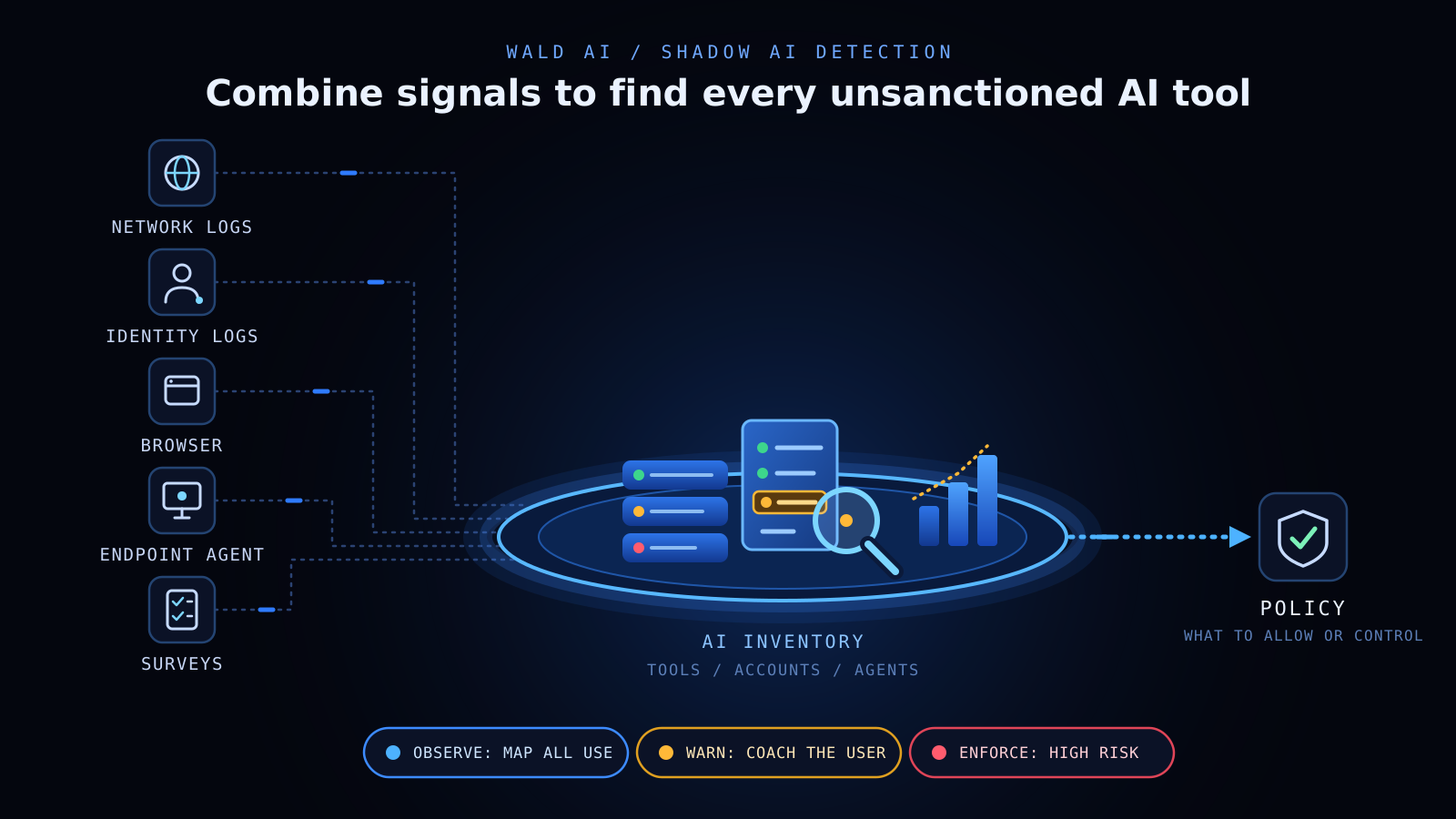
- No single signal finds everything. Network logs, identity logs, browser and endpoint telemetry each see a different slice, so most teams combine them.
- Netskope's 2026 report found the average organization sends about 18,000 prompts a month to SaaS gen AI apps, six times the prior year. Detection has to run continuously, not as a one-off audit.
- Detection reduces risk only when it feeds policy. Observe first, then warn, then enforce.
An executive whitepaper on how AI-Native DLP differs from legacy DLP, and what it means for enterprise security strategy.
Download Whitepaper
Employees adopt useful AI tools faster than governance can keep up. Netskope's Cloud and Threat Report 2026 found that the number of people using SaaS generative AI apps tripled over the year. The average organization now sends about 18,000 prompts a month to those apps, up from 3,000. Some of that use runs on personal accounts, outside any approved tool.
That is the case for shadow AI detection: finding which AI tools, accounts, and agents people use, and what data reaches them, before deciding what to allow. It is not about catching people. It is how security teams learn where AI helps the work and where sensitive data needs a guardrail.
Why shadow AI detection matters now
AI use at work has moved from experiment to routine. Verizon's 2026 Data Breach Investigations Report found that shadow AI is now the third most common non-malicious insider action in the DLP data it analyzed, and that 67% of AI use on corporate devices goes through non-corporate accounts.
The Cloud and Threat Report also adds a more hopeful signal. The share of gen AI users on personal AI apps fell from 78% to 47% in a year, while managed-account use rose from 25% to 62%. That suggests governance works when an approved option exists. Even so, the average organization still sees 223 gen AI data policy violations a month, and Infosecurity Magazine notes the count is likely an underestimate because shadow AI is hard to monitor.
There is also a timing problem. Traditional DLP was built for email and file transfer, so it often has little to say about a prompt typed into a chat window. Shadow AI detection closes that gap early, while policies are still easy to shape, instead of after habits have set.
Teams cannot govern what they cannot see. For a definition of the problem, read what shadow AI is and why it matters. The rest of this guide focuses on finding it.
Shadow AI risks that detection surfaces
Shadow AI risk shows up in four places, and a good detection program should be able to show you each one:
- Sensitive data in prompts. Latest studies found that source code was the most common data type submitted to AI tools. Contracts, customer records, and unreleased product roadmaps follow the same path.
- Personal accounts. Data shared through a personal account sits outside company retention, audit, and access controls.
- Coding assistants and browser extensions. These often run with broad access to files and repositories, and they rarely appear on an approved list.
- Agents and MCP connections. Autonomous agents can reach internal systems through MCP servers that no one registered.
Context matters here. Pattern matching finds a card number, but it can miss an unannounced acquisition described in plain language. Detection that understands the meaning of an interaction, not only its format, gives security teams a more accurate picture of real data exposure.
What is shadow AI discovery, and how does it work?
Shadow AI discovery is the process of building an inventory of the AI tools, accounts, and agents used across an organization, including those IT never approved. It works by combining technical signals, such as network traffic, identity logs, and endpoint activity, with input from business teams about how they use AI.
CSO Online's five-step approach to shadow AI, an opinion piece by a security consultant, leaves us with two takeaways:
- Pair questionnaires about business-unit use cases with traffic inspection or log analysis, so you learn both what is used and why.
- Build the inventory first. Frameworks such as the NIST AI Risk Management Framework, with its govern, map, measure, and manage functions, all assume you already have one to work from.
A useful inventory records five things for each tool: what it is, who uses it, whether the account is corporate or personal, what data types are involved, and the business reason for using it. That record turns a list of apps into decisions. Each tool can be sanctioned, tolerated with controls, or replaced with an approved alternative.
Discovery is not a one-time project. New AI tools and features appear every month, so the inventory needs a regular refresh.
Treat the first pass as a time-boxed sprint. Over about thirty days, most teams can run through four moves:
- Week 1. Pull existing network, proxy, and identity logs and list every AI domain and OAuth grant they show.
- Week 2. Survey department leads about the AI tools their teams rely on and the tasks they use them for.
- Week 3. Pilot an endpoint or browser signal with one or two teams to see desktop apps, coding assistants, and personal-account use.
- Week 4. Merge the results into one inventory, rank tools by data sensitivity, and agree on first policies.
The output is a short, ranked list the security team can act on, not a compliance report that no one reads.
Shadow AI detection methods compared
Each shadow AI detection method sees a different slice of AI use. The table shows what each one finds and where it falls short.
Log-based discovery shows both the value and the limits. Microsoft's Cloud Discovery in Defender for Cloud Apps analyzes firewall and proxy logs against a catalog of more than 31,000 cloud apps. Apps outside the catalog are not discovered by default, logs must come from supported sources, and the fields available vary by source. Integration with Defender for Endpoint extends discovery beyond the corporate network.
Most teams layer methods. Logs give breadth quickly. Endpoint or browser signals add depth on the devices where work happens. Surveys explain intent, which no log can. When you compare approaches, ask five questions:
- Does it see desktop apps and coding assistants, not only websites?
- Can it tell corporate accounts from personal ones?
- Does it understand what data was shared, or only that a site was visited?
- Does it cover agents and MCP connections?
- Does it work when the device is off the corporate network?
From detection to shadow AI prevention
Detection tells you where AI is used. Shadow AI prevention decides what happens next. A simple sequence keeps the two connected:
- Discover. Build and refresh the inventory of tools, accounts, and agents.
- Understand. Classify each use by the sensitivity of the data and the business need behind it.
- Govern. Decide which tools are sanctioned, which are tolerated with controls, and which are replaced. An AI contextual governance framework helps keep those rules tied to how AI is actually used.
- Protect. Enforce policy at the point where data meets the AI tool.
Roll controls out in stages. The CSO Online article suggests starting in an advice mode that flags risky prompts, then moving to blocking or sanitizing. Blanket blocking rarely holds. With 67% of AI use already on non-corporate accounts, a block list tends to move activity somewhere less visible. Offer an approved alternative alongside the policy so employees can keep working.
Wald's on-device AI DLP applies this at the endpoint. It operates directly on the device, covers ChatGPT, Claude, Gemini, and Copilot across browsers and native desktop apps, and inspects and enforces policies across MCP servers. A local model reads the meaning and intent of an interaction, not only its pattern, which reduces the false positives that cause teams to abandon static rules.
Agents deserve the same attention as chat tools. A coding agent or workflow agent can call internal systems through MCP, so policy needs to follow the action, not only the person. Decide early which connections are approved, which need review, and which should not run at all.
Wald complements network and cloud controls such as Zscaler, Netskope, and Microsoft Purview. Those tools see traffic and files. Wald adds protection at the AI interaction layer.
Shadow AI security: what a detection program needs to hold up
Shadow AI security depends on more than finding tools once. A program holds up when it meets six tests:
- Coverage beyond chat. It reaches desktop apps, browsers, coding assistants, agents, and MCP.
- Account awareness. It separates corporate use from personal use.
- Context. It judges what an interaction means, not only whether it matches a pattern.
- Coaching employees on safe AI usage. People see why a policy applies and get a safe way to finish the task.
- Evidence. Security and compliance teams can show which tools were used, which policies applied, and what action followed.
- Repetition. Discovery reruns on a schedule, so new tools surface quickly.
Consider a finance analyst who pastes a draft board summary into a personal AI account to tighten the wording. A log-based tool may see only that an AI site was visited. A control that understands context can recognize the content as confidential, apply the right policy, and point the analyst to an approved tool. The work still gets done, and the data stays inside the perimeter.
Start narrow and widen over time. Our guide to a phased AI DLP rollout shows how to sequence pilots, tune policies, and expand coverage.
Turning shadow AI detection into secure AI adoption
Shadow AI detection gives security teams an accurate picture of how AI is used. The strongest programs combine several signals, keep the inventory current, and connect what they find to policy that enables work. Start by observing, then guide, then enforce where risk is highest.
To see how on-device controls fit into that sequence, read the AI-Native DLP executive whitepaper, or book a demo with our team.
Frequently Asked Questions
What is shadow AI detection?
It's finding which AI tools, accounts, and agents employees use without approval, and what data reaches them, so you can set policy.
How do you detect shadow AI?
Combine network and proxy logs, identity logs, browser or endpoint signals, and team surveys. No single source sees everything.3.
Why does shadow AI detection matter?
AI use is growing faster than governance. Verizon found 67% of corporate-device AI use runs through non-corporate accounts, so you can't govern what you can't see.
What data is most at risk from shadow AI?
Source code is the most common data type submitted to AI tools, followed by contracts, customer records, and unreleased plans.
Are network logs enough to find shadow AI?
No. Logs give breadth but can miss off-network devices, personal accounts, and what was actually shared in a prompt.
How is shadow AI detection different from prevention?
Detection shows where AI is used. Prevention decides what happens next: sanction, control, or replace the tool, then enforce policy where data meets AI.
How does Wald AI help with shadow AI?
Our AI DLP runs on the device, covers major AI apps and MCP servers, and reads the context of each interaction to protect sensitive data without blocking work.
.png)