
Key Takeaways
- An MCP gateway is a single control point between AI agents and the MCP servers they call, so access rules, inspection and logging live in one place.
- The main controls are authentication, tool allowlists, request and response inspection, and audit logs.
- A gateway governs the connection, but it cannot tell on its own whether a tool call carries a customer record. Our desktop DLP agent adds that data-level check.
- A small team can start with an inventory and a short allowlist before adding anything else.
An executive whitepaper on how AI-Native DLP differs from legacy DLP, and what it means for enterprise security strategy.
Download Whitepaper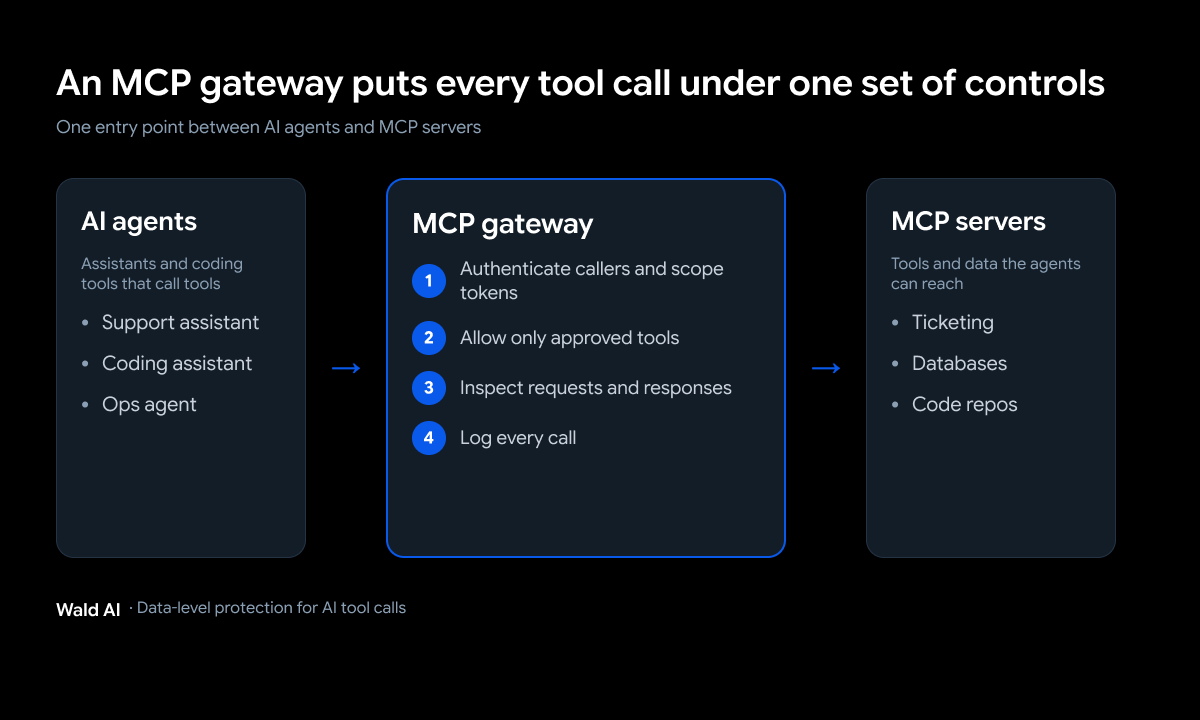
Consider a common scenario. A developer connects a new MCP server to an AI assistant so that it can read support tickets and query a database. The setup takes only minutes and functions well, so it is never submitted for review. Within weeks, the assistant is calling that server dozens of times a day, and the security team cannot say what it is able to reach.
An MCP gateway is designed to prevent this outcome, and understanding how it works and which controls it should enforce is the first step toward governing agent tool access.
What is an MCP gateway?
An MCP gateway is a controlled entry point between AI clients and one or more Model Context Protocol (MCP) servers. Instead of every agent connecting straight to every server, requests pass through the gateway, which decides what is allowed, checks what is being sent and records what happened.
How a gateway sits between agents and MCP servers
MCP is the standard that lets an AI assistant use external tools, such as searching files, reading a database or creating a ticket. Each tool lives on an MCP server, and the agent calls it by sending a request. With a gateway in place, the agent talks to one address and the gateway talks to the servers behind it. That gives your team a single place to apply rules instead of configuring every server separately, and a single place to look when something goes wrong.
How it differs from an API gateway or an LLM gateway
An API gateway manages ordinary web traffic, and an LLM gateway manages calls to language models, such as which model to use and what it costs. An MCP gateway deals with something different: the tools an agent is allowed to use and what it passes to them. It understands which tool is being called and by whom, which a general-purpose gateway usually does not. Most teams end up with more than one of these layers, and each handles a different job.
So then, why do MCP servers need security controls?
MCP makes it easy to give an AI agent real capabilities, which is exactly why it needs controls. Giving an assistant access to a calendar is low stakes, but giving it a database connection and permission to act is not, and the same protocol covers both. The OWASP MCP Top 10, which is still in beta, lists risks that did not exist when software only talked to other software.
Unmanaged MCP connections no one has inventoried
OWASP lists shadow MCP servers among its top risks. These are unapproved deployments that run outside normal security oversight, often set up by developers for convenience with default settings. It is the same pattern as any other tool people adopt without asking, which is why we have written about how to find unsanctioned AI use. You cannot protect a connection you do not know exists.
Tool poisoning and rug pulls
Tool poisoning happens when the description or output of a tool is manipulated to steer the AI's behavior. A related problem is a tool that looks fine when you approve it and changes later. Because the agent trusts a tool's description, a hidden instruction there can push it to do something the user never asked for. Neither risk shows up in traditional application security, which is part of why a dedicated control point helps.
Credentials and customer data leaking through tool calls
Every tool call carries data out, and many carry credentials in. API keys, access tokens and database credentials can end up in logs or in the agent's working memory, and sensitive material such as customer data or source code can be passed to a tool that should never see it. OWASP flags both token exposure and context over-sharing for this reason.
And how does an MCP gateway secure agent tool calls?
A gateway secures tool calls through a handful of controls, applied at the point where every request passes. The sequence below is the one we would put in place first, because each step builds on the one before it: you cannot enforce an allowlist for a caller you have not identified, and you cannot review a log that was never written.
Authentication and scoped tokens
The gateway should confirm who is calling before anything else. It should also make sure the credentials in use were actually issued for that server. The MCP specification calls out token passthrough, where a server accepts a token that was not meant for it and forwards it downstream, as an anti-pattern that can create a confused deputy problem.
A gateway can enforce that rule once for every server behind it. The same guidance recommends narrow scopes, because a token with broad permissions turns one leaked credential into access to everything.
Tool allowlists and least privilege
An allowlist says which tools each agent or team may use, and anything not on the list is refused by default. This matters because permissions tend to grow over time. OWASP describes this as scope creep, where loosely defined access expands until an agent can do far more than anyone intended.
Starting from a short list means a new tool has to be approved before it can be used. Does the agent that triages support tickets really need permission to change a repository? Usually not, and the allowlist is where that gets decided.
Request and response inspection
Inspection means looking at what goes into a tool call and what comes back. On the way in, the gateway can check whether a request includes something that should not leave. On the way back, it can check whether the response contains instructions aimed at the model, which is how poisoned content tries to take over. Inspection is also where you can stop a sensitive value from being sent to a server that does not need it.
Audit logs
Every tool call should leave a record: which agent called which tool, with what result and when. OWASP lists a lack of audit and telemetry as a risk of its own, because without logs you cannot investigate an incident or even tell what normal looks like. Gateway logs are far easier to use than records scattered across separate servers, since they sit in one place.
MCP security best practices to put in place
Controls work best when they follow a sensible order. These four are the ones we would start with, and none of them needs a large team.
Inventory every server, then approve it
List every MCP server in use, who owns it and what it can reach. Then decide which are approved. Anything you find that nobody owns is a candidate to switch off. This step is the foundation, because every other control depends on knowing what exists.
Pin reviewed tool definitions and re-review on change
When you approve a tool, record what it looked like at that point. If its description or behavior changes later, treat it as new and review it again. This is the practical defense against a tool that changes after approval.
Require approval for high-risk actions
Reading a document and deleting a database are not the same kind of action. Let low-risk calls run freely, and require a person to confirm anything that writes, deletes, sends or spends. That keeps agents useful without letting one mistaken instruction do lasting damage.
Sandbox local servers
Some MCP servers run directly on a developer's machine, with access to local files and credentials. Running them in a restricted environment limits what a compromised server can touch. It is a small step with a large effect on how far a problem can spread.
Where a gateway stops and data protection starts: Our View
A gateway answers who is calling and which tool they may use. It is much less equipped to answer a different question: what is actually inside the call. A request to an approved tool from an approved user can still carry a customer's records or a draft of an unannounced deal, and nothing about the connection itself reveals that.
We think the protection has to follow the meaning of the data as well as the path it takes. Manual policies can only address known behaviors, but AI interactions are dynamic and constantly evolving, so by the time a new exposure risk is discovered, it may be too late to configure a policy to prevent it.
That is as true of tool calls as it is of prompts. Our desktop DLP agent uses small language models (SLMs) on the device to spot sensitive data, understand what it means and apply the right policy before it is shared, and it extends to MCP-based integrations, inspecting and governing MCP servers before sensitive information reaches external tools.
It sits alongside a gateway and covers a different layer. For the wider picture of how autonomous tools change the risk, see how agentic AI changes security.
Up for a challenge?
How to Roll Out an MCP Gateway on a Small Team
You do not need a long project to get value. A small team in the USA or India can work through this in a few weeks.
Start with visibility. Run an inventory of the MCP servers your team uses and note which ones touch sensitive systems. Next, write a short allowlist of approved tools for each group, such as engineering, support and operations, and refuse everything else by default. Then turn on logging so every call is recorded, and review the logs after a couple of weeks to see how agents are actually used. Only after that is it worth adding stricter inspection and approval steps for high-risk actions.
Once the logs are flowing, two questions are worth asking each month: which tools are called most, and which are called by an agent nobody expected to use them. The answers show where the allowlist is too loose and where people are quietly working around it.
Keep the first version small. A short list that people follow is more useful than a long policy that gets bypassed, and you can widen it as you learn what your team needs.
Conclusion
An MCP gateway gives you one place to control how AI agents reach your tools: who can connect, which tools they can use, what passes through and what gets recorded. Start with an inventory, an allowlist and logs, then layer on inspection and approvals. Remember that the gateway controls the path, so you will also want something that understands the data moving along it. If you want to see how that fits together for your team, see Wald AI in action.
Frequently Asked Questions
What is an MCP gateway?
An MCP gateway is a controlled entry point between AI agents and MCP servers. It applies authentication, allowlists, inspection and logging in one place, so every tool call passes through the same checks.
Is an MCP gateway the same as an API gateway?
No. An API gateway manages general web traffic, while an MCP gateway understands which tool an agent is calling and who is calling it, and applies rules at the tool level.
Do you need an MCP gateway for a small team?
Not always on day one. If only a few people use a few approved servers, an inventory, an allowlist and logs may be enough. A gateway becomes worthwhile as the number of agents and servers grows.
What are the biggest MCP security risks?
OWASP's beta list includes token mismanagement, scope creep, tool poisoning, shadow MCP servers, missing audit logs and context over-sharing.
How does data protection work with an MCP gateway?
A gateway controls who connects to which server, and data protection checks what a call contains. Our desktop DLP agent inspects sensitive data on the device before it reaches external tools, so the two cover different layers.